Alignment Lab
The fastest way to set up your kart's front endDevelop setups before the track, visualise your karts' front-end geometry, and find your optimal setup in seconds
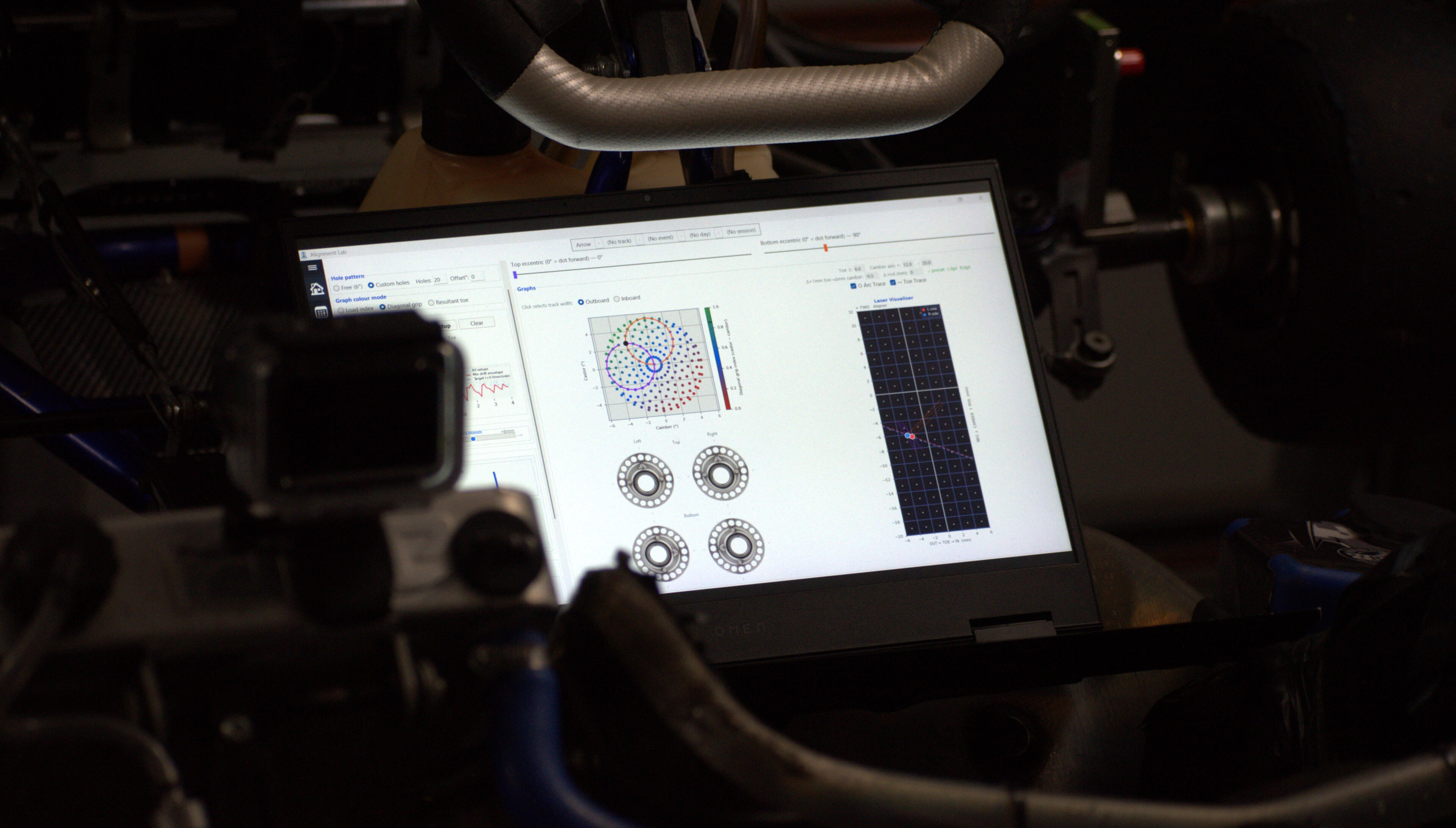
What makes alignment lab so useful?
Are you guessing your front-end setups for your kart? - Winning Drivers Don't GuessAre your lap times inconsistent and you aren't adapting to the karts handling? - Winning Drivers Adapt Their Setup For Consistent Quick LapsAre you writing your notes across pieces of paper? - Winning Drivers Have Organised Condensed Notes Of Vital Information
Alignment Lab Turns Midpack Drivers Into Front Runners
How alignment lab gets you to the front of the pack
Data Session Notes
Find your setup instantly
Setup Optimisation
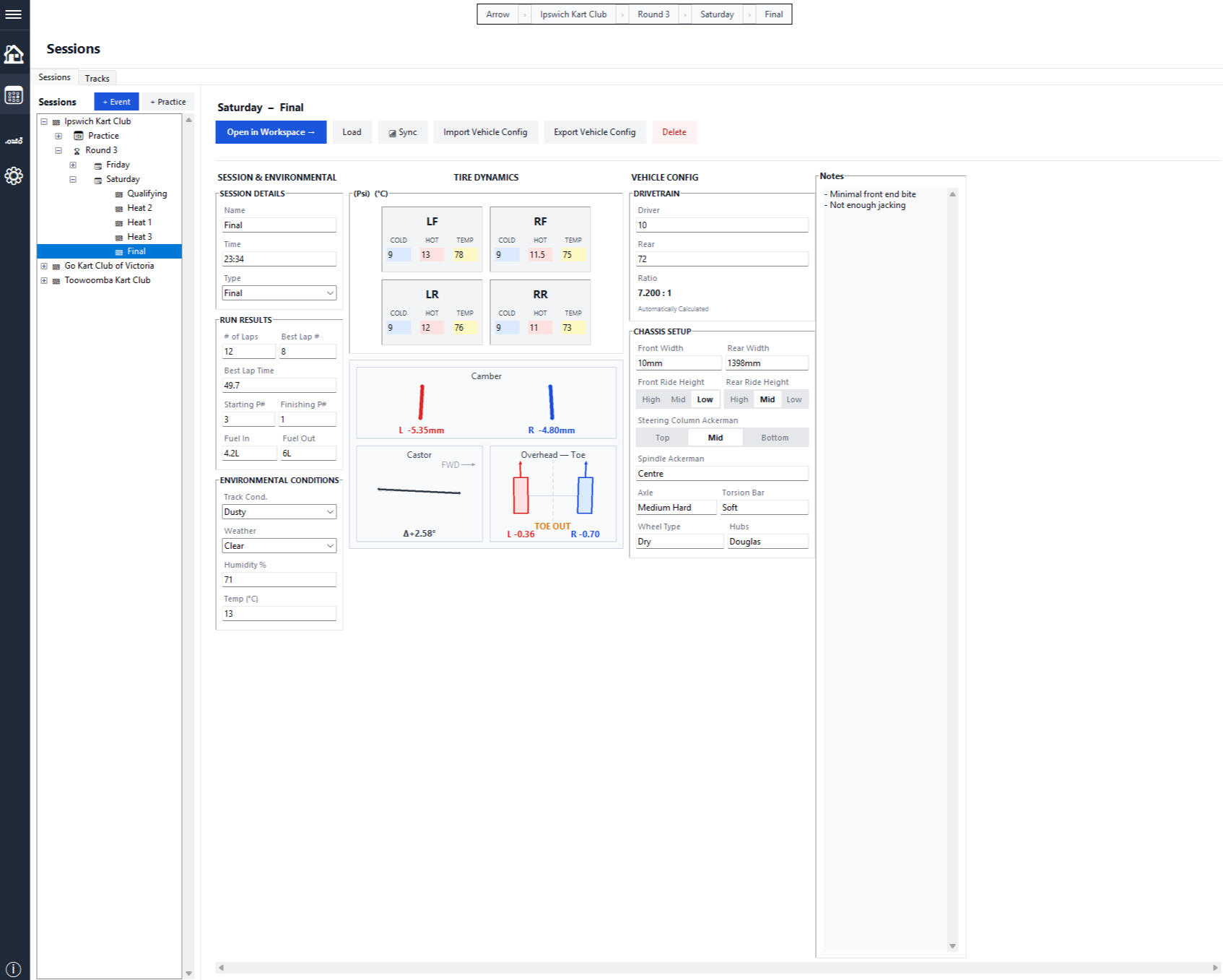
Every session, every track, every piece of information, logged and searchable
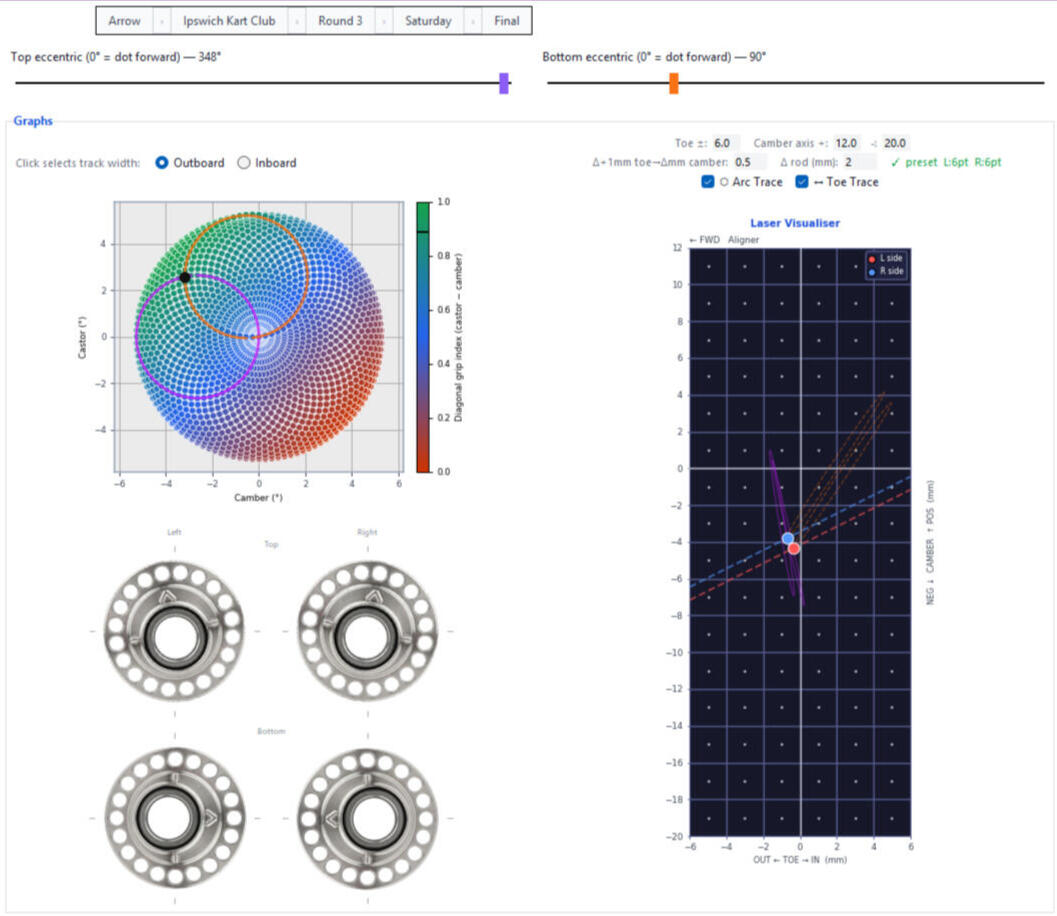
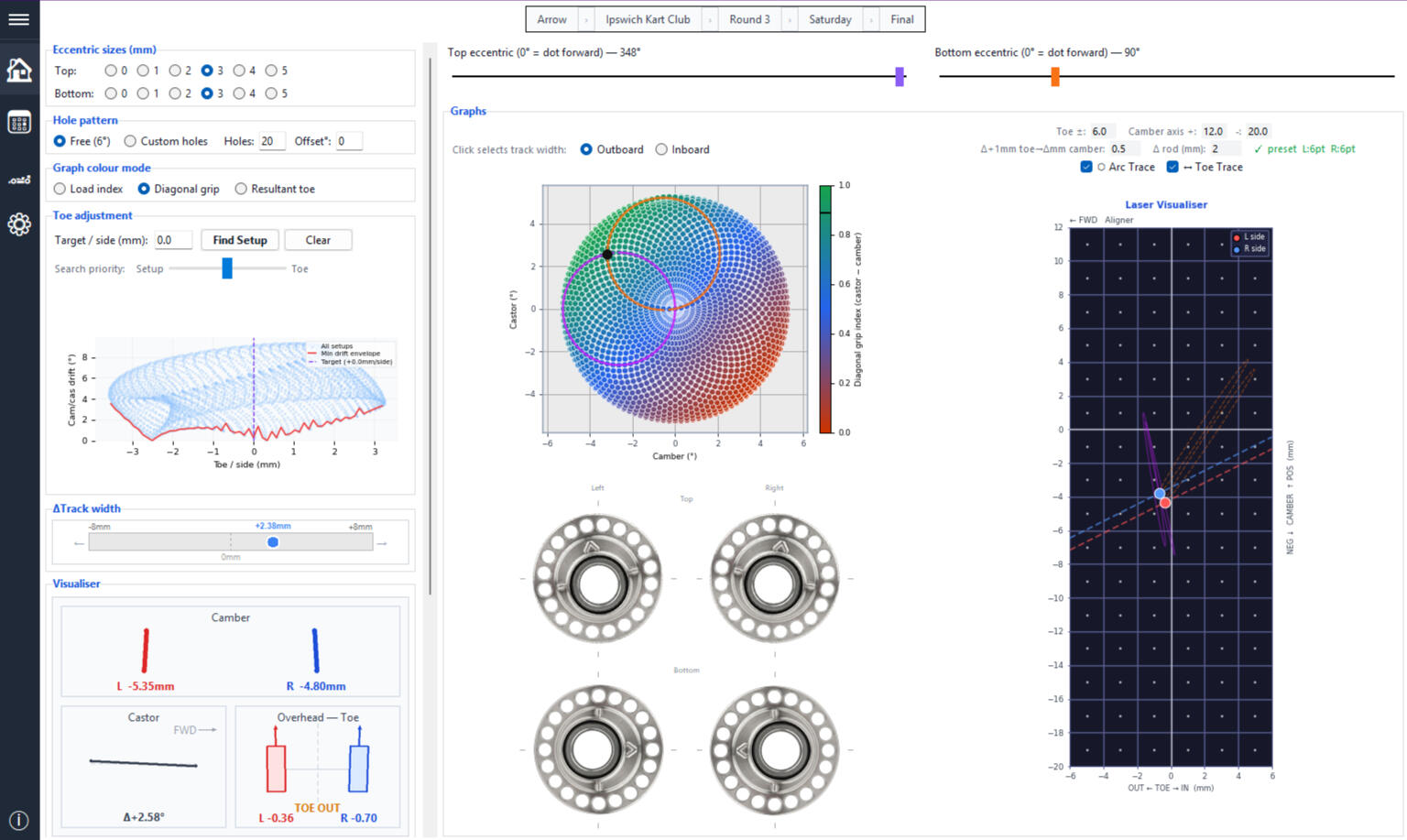
Pick the camber and castor you want. The visualiser shows you exactly how to set your rings to get there — no trial and error
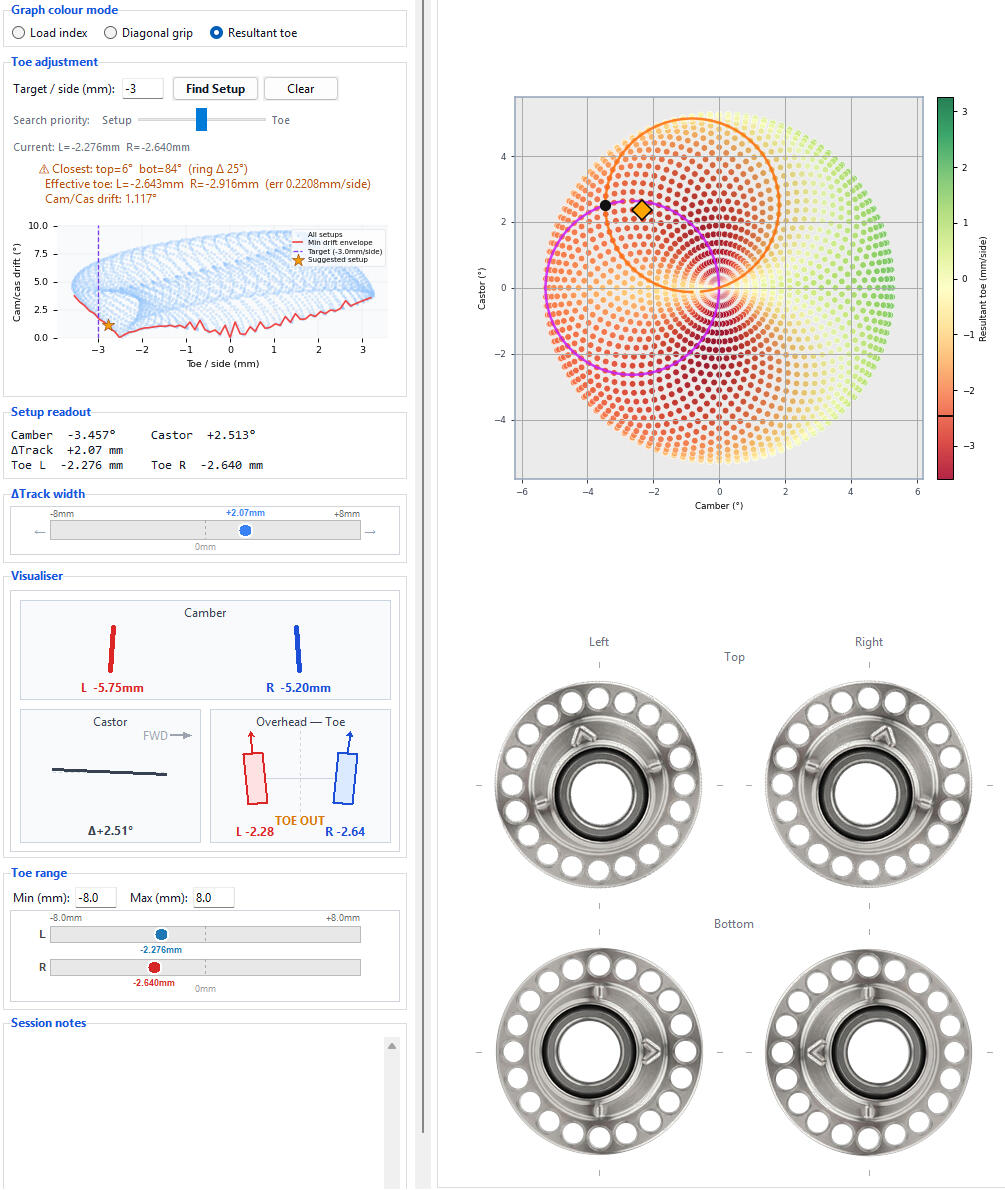
This is the feature that separates quick drivers from the rest. Give it a target toe value and the optimiser tells you the exact pill position to hit it — while camber, castor and track width update live.
What makes alignment lab so useful?
• No more guesswork - every ring position mapped before you touch the kart• Save time at the track - know exactly where to set eccentrics
without repeated laser aligner fitting• Never lose a setup - sessions log conditions, tyres, chassis and results• One Calibration, forever - calibrate once, remembered across every event (must recalibrate after a crash)• Tie rod adjustment without recalibration - log the adjustment and the model updates instantly• Hit your targeted toe in seconds - enter your desired toe, software finds the optimal ring positions based on your setup• Works with your laser aligners - predicts what they will read before you touch them
Lifetime Ownership
One purchase unlocks complete ownership of this software and future versions.
LAUNCH OFFER
Use code '25OFF' at checkout to save 25%
Single product license
$100 USD
Licence key supports up to one machine. Full access to every feature, all future updates included.
Dual Machine License
$190 USD
Licence key supports up to two machines. Ideal for a pair of drivers.
team License
$450 USD
Licence key supports up to five machines. This license is for teams with multiple drivers.
Have Questions or Feedback?
Got a question before you buy, a feature request, or found a bug? Reach out directly — all support is handled personally.
Alignment Lab Kart Front-End Geometry Tool Releases
Version 1.2.0
What's new?
• Garage — manage multiple kart profiles, each with their own ring type, eccentric sizes, bore spacing, and calibration saved per kart
• Session structure — sessions now organised into Track → Event → Day → Session with a breadcrumb bar always showing your active context
• Auto-save — active session saves every 3 seconds automatically
• Settings page — configure units, pressure unit, date format, autosave interval, and default kart
Improvements
• Scatter map dots are larger with improved colour scales
• Sliders now snap to valid positions while dragging with live angle readout
• Compact ring image now shown next to the scatter graph
Laser Visualiser, now shown vertically alongside the scatter map with independent ± camber axis ranges
• Toe trace slope now saved per kart
• Custom holes capped at 100
Version 1.1.0
What's new?
• Initial release
Have Questions or Feedback?
Got a question before you buy, a feature request, or found a bug? Reach out directly — all support is handled personally.
Alignment Lab Setup and Help Guide
Calibration Help
Software Help
How it works
The software builds a model of how eccentric pill position affects front toe and camber — measured directly from Sniper aligners in mm. Left and right sides are modelled independently. + = toe-in, − = toe-out.Toe calibration lives in the Garage page (⚙ sidebar icon). Select a kart from the fleet list, then use the Calibration section.
Before you start
• Set tie rods to racing length before calibrating. The model is only valid at the length it was calibrated at. If you adjust a tie rod afterwards, use ↔ Toe Trace — no need to redo the full calibration.
• Ideally have the driver seated during calibration so ride height reflects racing conditions.
• Set the eccentric sizes and select the correct Ring Type before calibrating.
• Calibration is stored per-kart in the Garage and saved automatically.
RING TYPES
• OTK 20 hole — 9 required preset positions (top + bottom ring)
• Birel 18 hole — 7 required preset positions (top ring only)
• Custom... — no fixed presets; name your brand and use the Additional calibration points section insteadSwitching ring type resets
calibration and pill positions.
required calibration points
The preset table shows specific eccentric positions to measure at. Grey-shaded boxes are required. White boxes are optional (improve fit accuracy).1. Click a position label — the eccentrics jump to that position
2. Set your kart eccentrics to match
3. Fit Sniper aligners and read: Toe L(mm), Toe R(mm), Cam L(mm), Cam R(mm)
4. Type all readings into the boxes on that row
5. Repeat for every position in the table
6. Press Apply Presets — the model fits instantly and the Laser Visualiser goes liveStatus colour: Green ✓ = 6+ points (good), Orange ✓ = 4–5 (usable), Red ✓ = ≤3 (limited). Aim for RMS < 0.3 mm
calibration context
Below the status label, 'Cal at:' records which eccentric position and how many total points were used when calibration was last applied. Check this matches your current setup before trusting predictions.
camber readings (grey-shaded rows)
Grey rows also require Cam L and Cam R readings. These calibrate the Laser Visualiser — once applied, the red dot (left) and blue dot (right) track what physical aligners would show at any position.
additional toe calibration points
Extra measured points on top of the presets to improve accuracy at positions important to your setup. Set eccentrics, fit aligners, read toe L and R, enter values, press Apply.• Fit — recalculates the model using all points combined
• Remove — deletes the selected manually-added point
• Clear — removes all manual points (presets kept)
• Reset — wipes everything including presets and restarts
tips
• Recalibrate whenever you change tie rod length or replace steering components
• More calibration points = better accuracy. Aim for 6+
• If you adjust a tie rod after calibrating, enter the delta into Δ rod (mm) instead of recalibrating
• Calibration is stored per-kart — switching the active kart automatically loads that kart's calibration
• Toe Targeting accounts for the active rod offset — Find Setup targets the correct physical toe automatically
Overview
Front-end geometry in a kart is governed by two eccentric pills on the chassis C-Section. Rotating either pill simultaneously changes camber, castor, and toe — three parameters coupled into one adjustment. Physical Laser aligners measure camber and toe, but castor remains invisible to them.This software computes the full cam/castor/toe output for every valid combination of both eccentric rings and, once calibrated, predicts aligner readings at any position without re-attaching hardware.Key capabilities:• Full cam/castor/toe map for every valid ring position
• Laser Visualiser — digital aligner in real time
• Toe Trace — model the effect of a tie-rod adjustment live
• Toe Targeting — find the best ring position for a target toe
• Overhead toe visualiser — quick visual of toe-in / toe-out
• Sessions — full event/day/session log with weather, tyres, chassis
• Garage — manage your kart fleet and saved setups
Navigation
The left sidebar contains the main navigation icons. Click any icon to switch between pages. The hamburger icon (≡) at the very top collapses or expands the sidebar.• Workspace — main geometry tools (graphs, visualiser, toe targeting)
• Sessions — event and session log
• Garage — fleet management and toe calibration
• Information — licence, updates, and helpContext bar — The bar along the top shows the active context: Kart → Track → Event → Day → Session. Chips update automatically when you load or rename anything. Click a chip to quickly switch the active item.
Eccentric Configuration
Before using the graphs, set the correct eccentric sizes and hole pattern in the top-left panel so the geometry model is accurate.Eccentric sizes (mm) — Enter the radius of the top and bottom eccentric pills in mm. These determine the magnitude of cam/castor/toe change per degree of rotation. Each ring can be set independently.Hole pitch (mm) — The centre-to-centre distance between the top and bottom eccentric ring seats on your kingpin carrier. Measure with calipers directly on your carrier. Default is 65 mm.Ring type — Select from the dropdown:• OTK 20 hole — 20-position top + bottom rings
• Birel 18 hole — 18-position top ring, fixed bottom
• Custom... — any brand; enter a name and hole countHole pattern — Custom holes: constrained to valid locking-screw positions. Free (6°): no locking screw, full 360° in 6° steps. Offset°: rotates the hole grid so position labels match the physical marking on your ring.
Camber / Castor Scatter Map
Every valid eccentric combination is plotted as a dot in cam/castor space, giving a complete picture of the accessible setup space at a glance. The black dot ● tracks your current slider position. Clicking any dot jumps the sliders to that combination instantly.Why the dots form spiral arms — Each ring traces a circular arc in cam/castor space as it rotates. Adjacent arms can carry very different toe values — two setups that read identically on gauges can produce different handling depending on which pills produced them.Purple / orange arcs — Purple: arc traced by rotating the TOP eccentric. Orange: arc traced by rotating the BOTTOM eccentric. Your current position always sits at their intersection.Colour modes• Load Index — front-end load distribution index, scaled 0–1
• Diagonal Grip — front-to-rear diagonal grip balance, scaled 0–1
• Resultant Toe — predicted average toe (mm/side) per pill combo. Requires toe calibration.Inboard / Outboard variants — Most cam/castor values are reachable by two pill combinations — one wider front track (outboard) and one narrower (inboard). The radio above the chart selects which variant is applied when you click a dot.
Laser Visualiser
A digital replica of physical laser aligners, updated in real time as you move the sliders.• Red dot ● = left side, Blue dot ● = right side
• X axis = toe (OUT ← → IN, mm), Y axis = camber (mm)Left and right sides are modelled independently. Hover near either dot to see its exact cam + toe reading.Arc Trace — Draws predicted arcs showing where the dots would move if you rotated each pill independently. Purple (solid): top eccentric. Orange (dashed): bottom eccentric. Requires toe calibration.Toe Trace — Models the effect of physically adjusting a tie rod without recalibrating. Enter the toe delta after adjusting the rod — the aligner dots, toe visualiser, readout box, and toe bar all update to reflect the adjusted physical toe in real time. Toe Targeting also accounts for the active rod offset automatically.
Overhead Toe Visualisor
A top-down schematic of both front wheels showing their current toe angle.• Blue arrow = left wheel, Red arrow = right wheel
• Angle is exaggerated 2.5× so small differences are easy to spot
• TOE IN (green), TOE OUT (amber), NEUTRAL (grey — within ±0.05 mm of zero)
• Reflects rod-offset-adjusted toe when Toe Trace is active
Toe Targeting
Enter a target toe value per side (mm) and press Find Setup. The software evaluates all valid eccentric positions and returns the one that achieves the target toe with the least cam/castor deviation from the current setup.Search Priority slider — Setup ◄────► Toe. Left: prioritises cam/castor preservation. Centre: balanced trade-off. Right: maximises toe accuracy.Result shown as a gold star (★) on the trade-off graph and orange diamond (◆) on the scatter map. Click either marker to apply to the sliders.Toe trade-off graph — Each blue dot is one valid eccentric position. X axis = average toe per side. Y axis = cam + castor drift from current setup. Red line = minimum cam/castor cost to reach each toe value.
Sessions
The Sessions page is the full event and session log. Data organised as:
Track → Practice / Race Event → Day → SessionEach session stores:• Performance — session type, result, laps, best lap
• Conditions — time, weather, humidity, temperature, track condition
• Tyres — cold/hot PSI and tyre temp per corner
• Chassis — sprockets, axle, widths, ride heights, fuel out/in
• Notes — free-text notes synced with the workspaceAuto-sync — When you create a new session the software automatically fetches current weather for your location. Use the Sync button to refresh at any time.Import from previous session — Copies chassis and tyre setup from the prior session. Conditions start fresh and sync from the internet.Open in Workspace — Loads the session's ring position, calibration, and settings into the main geometry workspace.
Garage
Manage your kart fleet. Each kart stores its name and toe calibration independently. Set a kart as active to link it to sessions and show its name in the context bar. Each kart can also store named saved setups — recall a known-good baseline quickly without loading a full session
Have Questions or Feedback?
Got a question before you buy, a feature request, or found a bug? Reach out directly — all support is handled personally.
Refund Policy
ALIGNMENT LAB — REFUND POLICYLast updated: June 2026This Refund Policy applies to all licence keys purchased for Alignment Lab ("Software") directly from Alignment Lab ("we", "us", "our"). It should be read together with our End User Licence Agreement.14-DAY REFUND WINDOW
We offer a refund on your licence key if you request one within fourteen (14) days of your purchase date. Within this window you may request a refund for any reason. After fourteen (14) days, refunds are no longer available under this voluntary policy, except where you are entitled to a remedy under applicable consumer law (see section 4).
HOW TO REQUEST A REFUND
To request a refund, email us at [email protected] from the email address used to make the purchase, and include your licence key and order or receipt details. We aim to respond within two (2) business days.
WHAT HAPPENS WHEN A REFUND IS ISSUED
When a refund is approved:
a) the purchase amount is returned to your original payment method;
b) your licence key is revoked and will no longer activate or validate the Software; and
c) you must cease all use of the Software and remove it from any machine on which it is installed.
Refunds are processed to the original payment method and may take several business days to appear, depending on your bank or payment provider.
YOUR CONSUMER LAW RIGHTS
If you are a consumer, this policy applies in addition to — and does not exclude, restrict, or modify — any rights or remedies you have under the Australian Consumer Law or any other consumer protection laws that apply to you. Our Software comes with guarantees that cannot be excluded under the Australian Consumer Law. Nothing in this policy limits those rights. If the Software is faulty, not as described, or otherwise fails to meet a consumer guarantee, you may be entitled to a remedy regardless of the 14-day window in section 1.
EXCEPTIONS
We may decline a refund where we reasonably believe a request is fraudulent, abusive, or made in bad faith — for example, repeated purchase-and-refund activity — except where a refund is required under applicable consumer law.
CHANGES
We may update this Refund Policy from time to time. The version in effect at the time of your purchase applies to that purchase.
CONTACT
Questions about this policy? Email [email protected].
Have Questions or Feedback?
Got a question before you buy, a feature request, or found a bug? Reach out directly — all support is handled personally.
Privacy Policy
ALIGNMENT LAB — PRIVACY POLICYLast updated: June 2026This Privacy Policy explains how Alignment Lab ("we", "us", "our") collects, uses, and protects information in connection with the Alignment Lab software ("Software"), our website, and the purchase of licence keys. It should be read together with our End User Licence Agreement.We collect as little information as possible to operate, and we do not sell your information to anyone.INFORMATION WE COLLECTa) Website usage. Our website is hosted on Carrd. We do not use advertising or cross-site tracking cookies. Carrd may set essential cookies required for the site to function, and provides us with aggregate, non-identifying visitor statistics such as page views and referring sites. This information does not identify you personally.b) Purchase information. When you buy a licence key, payment is processed by our payment provider. Our third-party payment provider collects and processes the payment details you enter. We receive your name, email address, country, and transaction details (such as the product purchased and the amount paid). We do not receive or store your full card or bank details — these are handled directly by our third-party payment providerc) Licence validation data. When you activate and use the Software, it contacts our licensing service (Keygen) to validate your licence key. The only data transmitted is your licence key and an anonymised machine identifier. No personal information, and no setup, vehicle, or geometry data, is sent to us or to Keygen.d) Communications. If you email us, we receive your email address and the contents of your message, and we keep that correspondence so we can respond and provide support.INFORMATION WE DO NOT COLLECT
We do not collect your card or bank details, and we do not collect, store, or transmit any of the setup, measurement, vehicle, or geometry data you enter into the Software. All such data stays on your machine.
HOW WE USE INFORMATION
We use the information described above to:
a) deliver your licence key and provide the Software;
b) validate licence keys and enforce the terms of the End User Licence Agreement;
c) provide customer support and respond to your enquiries;
d) detect and prevent fraud, abuse, and unauthorised use; and
e) meet our legal, tax, and accounting obligations.
HOW WE SHARE INFORMATION
We do not sell your personal information. We share it only with the service providers that allow us to operate, and only to the extent necessary:Keygen — licence key generation and validation;
Zapier — connecting our payment, licensing, and email systems to deliver your licence key automatically;
Google Workspace — sending your licence key and handling support correspondence;
Carrd — hosting our website.
The Software is distributed via GitHub Releases; downloading it is subject to GitHub's own privacy practices.
We may also disclose information where required by law, or where necessary to protect our legal rights.INTERNATIONAL TRANSFERS
Some of our service providers are located outside Australia, including in the United States. Where your information is transferred and processed overseas, we take reasonable steps to ensure it is handled in line with this policy and applicable law.
DATA RETENTION
We retain purchase and transaction records for as long as needed to provide the Software and to meet our legal, tax, and accounting obligations (generally five years under Australian law). Licence validation data is retained while your licence remains active. Support correspondence is kept for as long as needed to assist you.
SECURITY
We take reasonable measures to protect the information we hold against loss, misuse, and unauthorised access. However, no method of transmission or storage is completely secure, and we cannot guarantee absolute security.
YOUR RIGHTS
Depending on where you live, you may have the right to access, correct, or request deletion of the personal information we hold about you, and to object to or restrict certain processing. To make a request, email us at [email protected]. We will respond within a reasonable time and as required by applicable law. Note that we may need to retain certain information in order to meet our legal obligations.
CHILDREN
The Software and our website are not directed at children, and we do not knowingly collect personal information from anyone under 16.
CHANGES
We may update this Privacy Policy from time to time. The current version will always be available on our website, and the "Last updated" date above reflects the most recent change.
CONTACT
For any questions about this Privacy Policy or the information we hold, email us at [email protected].
Have Questions or Feedback?
Got a question before you buy, a feature request, or found a bug? Reach out directly — all support is handled personally.
Terms of Service
ALIGNMENT LAB — TERMS OF SERVICELast updated: June 2026These Terms of Service ("Terms") govern your access to and use of the Alignment Lab website, and your purchase of licence keys for the Alignment Lab software ("Software"). By using our website or purchasing a licence key, you agree to these Terms.These Terms work alongside our other policies:the End User Licence Agreement, which governs your use of the Software itself;
the Refund Policy, which governs refunds; and
the Privacy Policy, which explains how we handle information.
If there is any conflict between these Terms and the End User Licence Agreement regarding your use of the Software, the End User Licence Agreement applies.WHO WE ARE
The website and Software are operated by Alignment Lab ("we", "us", "our"). You can contact us at [email protected].
ELIGIBILITY
To purchase a licence key you must be at least 18 years old (or the age of majority where you live), or have the permission of a parent or guardian, and you must be able to form a legally binding contract. By purchasing, you confirm that the information you provide is accurate.
THE WEBSITE
You agree to use our website only for lawful purposes. You must not attempt to disrupt or compromise the website, gain unauthorised access to it, or use it in any way that infringes the rights of others or breaches any law.
PRODUCTS AND LICENCES
We sell licence keys that grant the right to use the Software on a set number of machines, as described for each licence tier at the time of purchase. Your use of the Software is governed by the End User Licence Agreement. A licence key does not transfer any ownership of the Software to you.
PRICING
Prices are shown in United States Dollars (USD) unless stated otherwise. Your bank or payment provider may apply currency conversion or other fees, which are your responsibility. We may change our prices at any time, but changes do not affect purchases already completed. Prices are exclusive of any taxes unless stated; you are responsible for any taxes or duties that apply to your purchase.
ORDERS AND PAYMENT
Payment is processed by our payment provider. Your order is complete once your payment has been successfully processed and your licence key has been issued. We may refuse or cancel an order where we reasonably suspect fraud, abuse, or a breach of these Terms, or where an order cannot be processed.
DELIVERY
Licence keys are delivered electronically to the email address associated with your purchase, normally automatically and shortly after payment. It is your responsibility to provide a correct email address and to check your spam or junk folder. If your key does not arrive, contact us at [email protected].
REFUNDS
Refunds are governed by our Refund Policy, which forms part of these Terms.
PRIVACY
Our handling of your information is described in our Privacy Policy, which forms part of these Terms.
INTELLECTUAL PROPERTY
All content on our website — including text, graphics, logos, branding, and the Alignment Lab name — and all rights in the Software, are owned by us or our licensors and are protected by law. You may not copy, reproduce, or use any of this content without our prior written permission, except as expressly allowed under the End User Licence Agreement.
THIRD-PARTY SERVICES
We rely on third-party services to operate, including our third-party payment provider (payments), Keygen (licensing), Zapier (automation), and GitHub (software distribution). Your use of those services may be subject to their own terms and privacy practices. We are not responsible for the content or practices of any third-party service or website we link to.
AVAILABILITY
We aim to keep the website and Software available, but we do not guarantee uninterrupted or error-free operation. We may modify, suspend, or discontinue any part of the website or Software at any time, including for maintenance or updates.
DISCLAIMER
Except as required by law, our website and services are provided "as is" and "as available" without warranties of any kind. The safety and accuracy disclaimer in the End User Licence Agreement applies to your use of the Software: all calculated outputs are a guide only and must be independently verified by a qualified person before being applied to any vehicle.
LIMITATION OF LIABILITY
To the maximum extent permitted by law, our total liability to you arising from or in connection with these Terms, your purchase, or your use of the website or Software will not exceed the amount you paid for your licence key. We will not be liable for any indirect, incidental, special, or consequential loss, including loss of data, loss of profits, or personal injury. Nothing in these Terms limits liability that cannot be limited by law.
YOUR CONSUMER LAW RIGHTS
If you are a consumer, these Terms apply in addition to — and do not exclude, restrict, or modify — any rights or remedies you have under the Australian Consumer Law or other consumer protection laws that apply to you. Our products come with guarantees that cannot be excluded under the Australian Consumer Law. Where a consumer guarantee applies and cannot be excluded, and our products are not of a kind ordinarily acquired for personal, domestic, or household use, our liability for failing to comply with that guarantee is limited, at our option, to resupplying the Software or paying the cost of having it resupplied.
SUSPENSION AND TERMINATION
We may suspend or terminate your access to the website, and revoke a licence key, where you breach these Terms or the End User Licence Agreement, as described in the End User Licence Agreement.
CHANGES TO THESE TERMS
We may update these Terms from time to time. The current version will always be available on our website, and the "Last updated" date above reflects the most recent change. Changes apply from the date they are posted, and do not affect purchases already completed.
GOVERNING LAW AND DISPUTES
These Terms are governed by the laws of Australia, and you submit to the non-exclusive jurisdiction of the courts of Australia. In the event of a dispute, the parties agree to attempt resolution through good-faith negotiation, and then mediation, before commencing legal proceedings.
SEVERABILITY
If any provision of these Terms is found to be invalid or unenforceable, that provision will be modified to the minimum extent necessary to make it enforceable, and the remaining provisions will continue in full force and effect.
CONTACT
Questions about these Terms? Email us at [email protected].
Have Questions or Feedback?
Got a question before you buy, a feature request, or found a bug? Reach out directly — all support is handled personally.
End User License Agreement
END USER LICENCE AGREEMENTLast updated: June 2026PLEASE READ THIS AGREEMENT CAREFULLY BEFORE ACTIVATING OR USING ALIGNMENT LAB ("SOFTWARE"). BY TICKING THE ACCEPTANCE BOX AND ACTIVATING THE SOFTWARE YOU AGREE TO BE BOUND BY THESE TERMS. IF YOU DO NOT AGREE, DO NOT ACTIVATE OR USE THE SOFTWARE."Licensor" means Alignment Lab.
"You" means the individual or entity that purchased the licence key.GRANT OF LICENCE
The Licensor grants you a personal, non-exclusive, non-transferable, revocable licence to install and use the Software on the number of machines permitted by your licence key, solely for your own internal purposes.
RESTRICTIONS
You must not:
a) copy, modify, adapt, translate, or create derivative works of the Software;
b) reverse-engineer, decompile, disassemble, or attempt to extract the source code;
c) sell, sublicence, rent, lease, or otherwise transfer the Software or your licence key to any third party;
d) use the Software for any unlawful purpose or in violation of any applicable law;
e) remove or alter any proprietary notices, labels, or marks on the Software.
INTELLECTUAL PROPERTY
All title, ownership, and intellectual property rights in and to the Software remain exclusively with the Licensor. This agreement does not transfer any ownership rights to you. All rights not expressly granted are reserved.
UPDATES AND CHANGES
The Licensor may release updates, patches, or new versions of the Software at any time, made available for voluntary download. Your installed version is not modified without your action. The Licensor reserves the right to change the features or functionality of future versions. If you choose to install an update, continued use of the updated Software constitutes acceptance of any revised terms accompanying that release.
SAFETY AND ACCURACY DISCLAIMER
The Software provides calculated geometry values as a guide only. All outputs must be independently verified by a qualified person before being applied to any vehicle. The Software is not certified for safety-critical applications. You assume full responsibility for any decisions made based on Software outputs.
DISCLAIMER OF WARRANTIES
To the maximum extent permitted by applicable law, the Software is provided "as is" and "as available" without warranty of any kind, express or implied, including but not limited to warranties of merchantability, fitness for a particular purpose, accuracy, or non-infringement.
LIMITATION OF LIABILITY
To the maximum extent permitted by law, the Licensor's total liability to you for any claim arising under or in connection with this agreement shall not exceed the amount you paid for the licence key. The Licensor shall not be liable for any indirect, incidental, special, consequential, or punitive damages, including loss of data, loss of profits, or personal injury, even if advised of the possibility of such damages.
PRIVACY AND DATA
The Software does not collect, store, or transmit any personal data beyond what is required to validate your licence key with the Licensor's licensing service (Keygen). The only data transmitted is your licence key and an anonymised machine identifier. No personal or setup data is sent to the Licensor. Our full data practices are described in our Privacy Policy.
REFUNDS
Refunds are governed by our Refund Policy, which forms part of the terms applying to your purchase. Nothing in this agreement or in that policy excludes, restricts, or modifies any rights or remedies you may have under applicable consumer law, including the Australian Consumer Law.
TERMINATION
This licence is effective until terminated. It will terminate automatically and without notice if you breach any term of this agreement. Upon termination you must immediately cease all use of the Software and destroy all copies in your possession. The Licensor may also terminate this licence at any time by revoking your licence key.
DISPUTE RESOLUTION
In the event of a dispute arising from this agreement, the parties agree to attempt resolution through good-faith negotiation before commencing legal proceedings. If negotiation fails, disputes shall be submitted to mediation in accordance with Australian law before either party may initiate litigation.
SEVERABILITY
If any provision of this agreement is found to be invalid or unenforceable, that provision shall be modified to the minimum extent necessary to make it enforceable, and the remaining provisions shall continue in full force and effect.
ENTIRE AGREEMENT
This agreement constitutes the entire agreement between you and the Licensor with respect to the Software and supersedes all prior agreements, representations, and understandings.
GOVERNING LAW
This agreement is governed by and construed in accordance with the laws of Australia. You submit to the non-exclusive jurisdiction of the courts of Australia.
Have Questions or Feedback?
Got a question before you buy, a feature request, or found a bug? Reach out directly — all support is handled personally.
FAQ
Alignment Lab — Frequently Asked QuestionsWhat does Alignment Lab do?
Alignment Lab calculates your kart's actual front-end geometry — camber and caster — directly from your eccentric ring positions. Instead of setting up and reading a laser aligner every time, you enter your ring positions within the software and get predicted geometry values in seconds.Why doesn't the predicted numbers match exactly what I measured?
The app doesn't just store your readings; it builds a formula from them and predicts the rest. The maths is a trig model (a sine curve for each pill, since that's how they move), fitted to all your points at once. So any one spot can land slightly off, which is the trade-off for mapping positions you never measured.How does the prediction model actually work
You measure your toe and camber at a handful of pill positions when you calibrate. From those readings the app works out how much the top pill and the bottom pill each shift your toe and camber, turning that into an equation for your kart. Once it knows that, it can tell you the toe and camber at any pill combination, including ones you never bothered to measure.How accurate is are the predictions?
Depends a lot on how good your calibration is. Toe's the side it does best, and it's what the setup finder uses, so that's the one to work off. It's still a model though, so use it as a strong guide rather than fact. Camber sits alongside to show you which way things are moving as you turn the pills, which is handy when you're chasing a setup but not as accurate as toe.What if i want to adjust my tie rod lengths?
Just use Toe Trace to log how far you've moved the rod, and set the "camber per 1mm of toe" figure so the app knows how much your camber shifts along with it. From there, it keeps both your toe and camber tracking at the new rod length, so you can carry on adjusting as normal.What's the difference between the three licences?
It's the number of machines the licence key activates on:Single Machine — one computer, for an individual.
Dual Machine — two computers, ideal for a pair of drivers.
Team — up to five computers, for teams running multiple drivers.All three include every feature and all future updates. The only difference is how many machines you can run it on.What do I need to run it?
Alignment Lab is a Windows-exclusive desktop application and needs no special hardware. It runs on Windows 10 and 11.How do I get the software and my licence key after buying?
Your licence key is emailed to you automatically after purchase. You download Alignment Lab from our releases page, install it, and enter your key to activate.Can I move my licence to a new computer?
Yes. If you replace or upgrade your computer, you can deactivate your old machine from within the software to free up a seat, then activate it on the new one. Your licence is tied to your machines and can't be transferred to other people.Do I need to be online to use it?
You'll need an internet connection to activate your licence, and periodically afterwards to re-validate. In between those checks it works normally offline.Do I get updates?
Yes — all future updates are included with every licence at no extra cost. When a new version is released, you can download and install it whenever you like.Is my setup data private?
Completely. None of your setup, measurement, or geometry data ever leaves your computer — it isn't collected, stored, or transmitted to us. The only thing the software sends is your licence key and an anonymised machine identifier, purely to validate your licence. Your numbers stay yours.Is there a free trial?
There's no free trial, but a 14-day money-back guarantee covers every purchase — so you can buy it, try it on your own setup, and get a full refund within 14 days if you aren't satisfied.What's your refund policy?
You can request a full refund within 14 days of purchase, for any reason. See our Refund Policy for the full details.
Have Questions or Feedback?
Got a question before you buy, a feature request, or found a bug? Reach out directly — all support is handled personally.